Rss/Web feeds have been added (in Rss2 and Atom formats) to the blog, so now you can read the blog contents using the feed aggregator of your choice (like Feedly, The Old Reader, and many more).
Add maldorne.org to your favorite aggregator (web or app) and they should be detected automatically. Just in case, the links are:
A fantastic video for the weekend, about adding some juice to your game, giving it some bells and whistles. Take some ideas from here, for every kind of game, not only the graphical ones.
Trying to add some more useful information to the web, and adding some documentation, this week I made a timeline of the versions of ccmudlib and Hexagon, and added it to the About page so you can take a look.
Not very game-designy, but is a way of stating the amount of work done during the last years, giving dates and specific versions. Maybe some other time I could add some more information there.
The same as shops were reviewed the last month, now pubs have been reviewed and they are operative. You can take a look to the ones included with de Fantasy Demo game:
> buy liquor
You drink a glass of liquor.
> [ HPs: 172 (172) EPs: 172 (154) ]
As you can see, food and drinks will recover partially your health, and alcoholic beverages will also affect your perception, getting your character drunk.
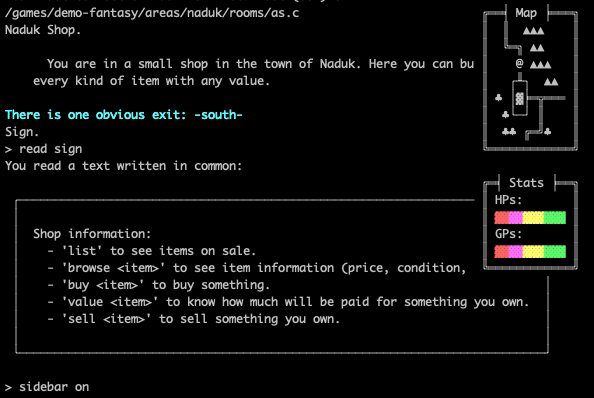
I’ve been playing with the vt100 terminal specification (read some history on the wikipedia, or some verytechnical specification), and although is not very useful yet, some results can be shown:
Has to be really, really improved, as at the moment everything is recalculated with every message sent to the user, but now we can draw characters (and boxes with content) at any position of the screen. Obviously, this will be optional and configurable per player, as not every mud client is compatible with the vt100 spec.
The worldmap is fake for now, but I’m working on it :)
Some improvements have been done in the way some ascii/ansi characters are handled, doing extensive use of the new chr() efun, so problems wouldn’t appear with the encodings of the files in the mudlib. Still a work in progress with some things to polish, but seems to be working.
Take a look to the frames handler that renders boxes with text inside if you need more info, in /lib/handlers/frames.c.
At last, shops have been reviewed and they are operative. You can take a look to the ones included with de Fantasy Demo game:
/demo-fantasy/areas/erken/rooms/BS.c
/demo-fantasy/areas/naduk/rooms/as.c
/demo-fantasy/areas/elfereth/rooms/z21.c
One in every town.
Shop.

      You are in a small shop in the town of Erken. Here you can buy or sell every
    kind of item with any value.

There is one obvious exit: -north-
Sign.
By default, a sign will be added:
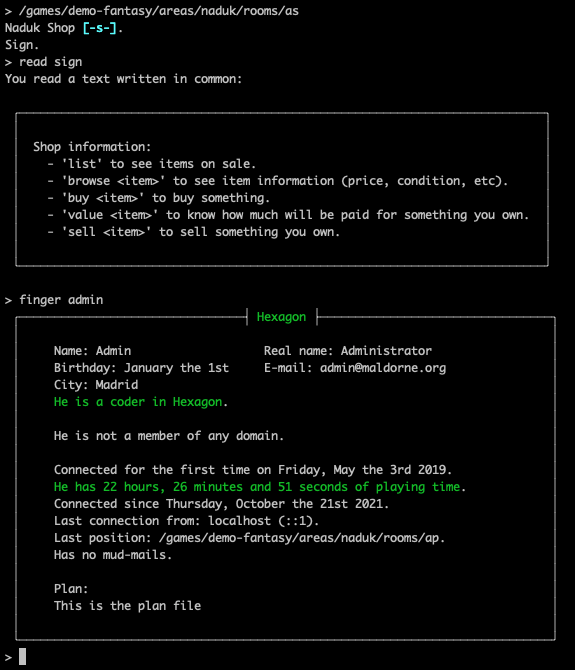
> read sign
You read a text written in common:

 ┌───────────────────────────────────────────────────────────────────────────┐
 │                                                                           │
 │  Shop information:                                                        │
 │    - 'list' to see items on sale.                                         │
 │    - 'browse <item>' to see item information (price, condition, etc).     │
 │    - 'buy <item>' to buy something.                                       │
 │    - 'value <item>' to know how much will be paid for something you own.  │
 │    - 'sell <item>' to sell something you own.                             │
 │                                                                           │
 └───────────────────────────────────────────────────────────────────────────┘
And the commands can be used in any shop:
> list
We have fourteen items available:

   Just one Cape (1)
   A great selection of Daggers (9)
   Two Shirts (2)
   Just one Small wooden shield (1)
   Just one Trousers (1)

Max amount: 30000, current amount: 1136

> buy cape
You buy Cape for 4 bronze coins and 8 copper coins.
Originally, in the old library used on MudOS, we had a handler for functionalities that needed to run periodically, which was timed.c. Its operation was somewhat archaic, requiring each desired action to be added manually in a not very intuitive way, and it wasn’t very maintainable. We have evolved this towards a cron + crontab system, similar to how it operates in an operating system.
Now there exists a crontab file at /save/crontab, structured like this:
# Edit this file to introduce tasks to be run by cron. # # Each task to run has to be defined in a single line, # indicating when it will be run, the file that will be # loaded, and the function that will be called in the file. # # Times are indicated using values for # minute (m), hour (h) or use '*' in these fields (for 'any'). # */n for minutes or hours divisible by n
# m h object function
# every minute, update_ventures * * /lib/handlers/ventures.c update_ventures
# every 23 hours, auto reboot 0 */23 /lib/handlers/shutdown.c auto_reboot
# every ten minutes, check if a reboot is needed # if we are using too much memory */10 * /lib/handlers/shutdown.c memory_reboot
Each line represents a functionality to be executed periodically, a specific function from a specific file. The left values represent the minutes and hours of the day. For example, we can see that 0 */23 means that at hours divisible by 23 (actually eleven at night, we could have just put 23), at 0 minutes (exactly eleven o’clock), an auto_reboot will be executed. Or that every hour (*), at minutes divisible by 10 (*/10), it will check if we are using too much memory or not, to potentially force another reboot.
It doesn’t have as many configuration options as a real crontab from an operating system, but it’s probably sufficient for the needs we’re going to have, and it’s already much better than what we had before.
The old tell_player() function has been removed, and a better notifications system is in place. Now, every time we need to notify a player of something really important, we can use:
user->add_notification(type, message);
and it will be shown after the pending actions and current heart_beat has finished (this is useful to avoid situations like entering a new room, something happening and the message would be shown before seeing what is inside said room).
The player will be able to show their last notifications:
> notifications

 ╒════════════════╡ Past notifications ╞═════════════════╕
 │                                                       │
 │   19:18:55 - You are connected! Welcome to Hexagon.   │
 │                                                       │
 ╘═╕/════════════════════════════════════════════════════╛